Hello and welcome to our next post. We hope you take the great momentum of our last post where you were able to run your first Python program. In this post, you’ll learn about Python Packages and Virtual Environments. Let’s get started!
Python Packages
The beauty of Python and one of the reasons why it is so popular and beginner-friendly is the huge community: There are a lot of people in forums that can help you if you get stuck, and there is a lot of code created by other people that you can reuse for your own projects.
While implementing your program, you’ll face multiple challenges. Imagine you want to plot some data or you want to solve some mathematical equation. No matter what, chances are high that someone else has already done that exercise before and most likely there is a Python package that you can download and use to solve your problem.
Isn’t this cool? We will show a quick example in this post.
Virtual Environments
One challenge is to keep all packages, that are relevant to your project, organized. This is what virtual environments are for. Let’s skip the theory and directly jump into a concrete example. Typically, you create one virtual environment (short: venv) per project. For the counter, that we’ve implemented in our previous post we haven’t created a venv yet. So, let’s do it now. Here is again the code we developed in our previous post:
def simple_counter(target):
    count = 1
    while count <= target:
        if count == target:
            print("Finally done! Count is:", count)
        elif count >= target - 2:
            print("Almost there! Count is:", count)
        else:
            print("Stay patient! Count is:", count)
        count += 1

simple_counter(5)
You create the venv using:
$ python -m venv counter_venv
This creates a new venv called counter_venv. Of course, you can choose whatever name you like. If we want to work with a venv we have to activate it:
$ source counter_venv/bin/activate
You can check that it works with the following command:
$ which python
counter_venv/bin/python
This command returns the path to the used Python binary. In our case, it should point to a path inside our created environment.
Pip - Python’s Package Manager
Let’s take our counter and put some colors on the output. And yes! There is a package called rich that makes our lives very easy. For installation, we use Python’s package manager Pip:
$ pip install rich
Note that this will install the package only for the activated venv.
Our Counter with beautiful colors
from rich import print

def simple_counter(target):
    count = 1
    while count <= target:
        if count == target:
            print("[green]Finally done![/green] Count is:", count)
        elif count >= target - 2:
            print("[yellow]Almost there[/yellow]! Count is:", count)
        else:
            print("[red]Stay patient[/red]! Count is:", count)
        count += 1

simple_counter(5)
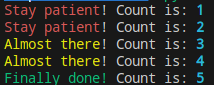
At the beginning of our code, you see a new import statement. The rich package defines a print function that we want to use. Inside the print, we simply annotate the desired color in square brackets. Isn’t that easy?
Well … You might wonder how we know about this package and how to use it. The answer is a mix of Google, ChatGPT, and documentation. For example, you can find the documentation of the rich package here. After some time you will know the most popular packages.
Finalize your project
When your project is ready and you want to distribute it to others, you need to make sure that they install the same packages as you did. This can easily be done using:
$ pip freeze > requirements.txt
If you open the file, you’ll find the following content:
markdown-it-py==3.0.0
mdurl==0.1.2
Pygments==2.19.1
rich==14.0.0
At the end, you can spot the rich package including a version tag. This is important and guarantees that someone else uses the exact same version as you used for development. But what about the other listed packages? They are required by the rich package itself. Pip keeps track of all dependencies automatically and installs required packages for you. You can check a package’s information using:
$ pip show markdown-it-py
Name: markdown-it-py
Version: 3.0.0
Summary: Python port of markdown-it. Markdown parsing, done right!
Home-page: https://github.com/executablebooks/markdown-it-py
Author:
Author-email: Chris Sewell <chrisj_sewell@hotmail.com>
License:
Location: /home/bjoern/projects/hello_world/counter_venv/lib/python3.13/site-packages
Requires: mdurl
Required-by: rich
You can see that it is required by the rich package and itself requires mdurl.
Once you have exported your requirements, someone else just needs to install them using:
$ pip install -r requirements.txt
When you want to leave your venv you can deactivate it using:
$ deactivate
Useful Packages
While the most useful Python packages will depend on your specific project, here are some widely used and popular packages that are definitely worth exploring:
- NumPy – Core library for numerical computing and working with arrays.
- Pandas – Powerful data analysis and manipulation toolkit.
- Requests – Elegant and simple HTTP library for making API calls.
- Matplotlib – 2D plotting library for creating charts and graphs.
- Scikit-learn – Machine learning library for classification, regression, clustering, and more.
- BeautifulSoup – HTML and XML parser used for web scraping.
- Pytest – Popular framework for writing and running tests.
- FastAPI – Modern, fast (high-performance) web framework for building APIs.
Summary
We hope this post helped you understand how to organize Python packages using virtual environments! Let’s quickly recap what we covered:
- Python has a huge ecosystem of reusable packages you can install and use in your projects.
- Virtual environments (venv) help to organize packages for your project
- You learned how to:
- Create and activate a virtual environment
- Use pip to install packages like rich
- Use pip freeze to save dependencies to a requirements.txt file
- Use pip show to inspect package metadata and dependencies
- We also introduced some popular Python packages worth checking out.
At this point, you are ready to start your own project! You can start by picking one of the listed packages and playing around with it. The internet is full of awesome projects, so we are sure you will find an idea for your first own project! Happy coding, and don’t forget to follow us on X.
Back to top ↑